
Independent reviews — we don’t sell software, and we list every tool’s weaknesses, not just its strengths.
Quick answer: “HVAC estimating software” means two completely different things, and picking the wrong type wastes months. If you do residential service and equipment replacement — furnaces, AC change-outs, mini-splits — you want field estimating with a flat-rate pricebook and good/better/best proposals: Housecall Pro (best for on-site proposals), Jobber (simplest), or FieldEdge (flat-rate pricebook depth). If you do commercial ductwork and sheet-metal bids from blueprints, you want takeoff software: PlanSwift, FastDUCT, or QuoteSoft. The breakdown below sorts out which camp you’re in and the best pick for each.
The split nobody explains: takeoff vs. field estimating
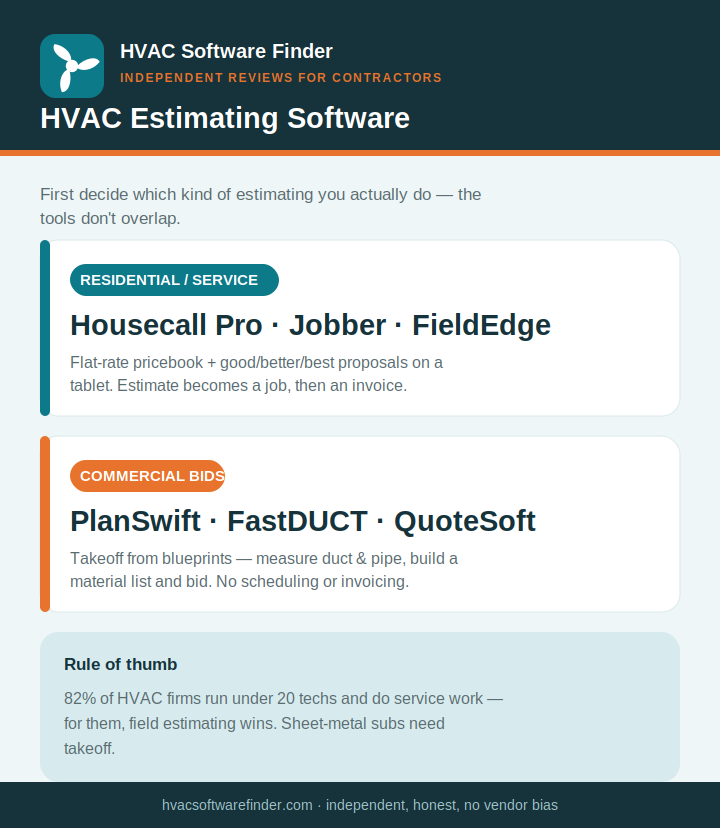
Search “HVAC estimating software” and you’ll get a jumble of tools that don’t actually compete with each other — because the term covers two separate jobs. Almost every vendor page blurs this, because each is selling one tool and wants to look like the answer. We’re independent and sell nothing, so here’s the distinction that should drive your whole decision:
- Field service estimating (flat-rate / proposal software). For residential and light-commercial service: a tech is at the house, pulls up a priced repair or equipment-replacement option on a tablet, presents good/better/best with financing, and gets a signature before leaving. The estimate becomes a job, then an invoice. Tools: Housecall Pro, Jobber, FieldEdge, ServiceTitan, QuoteIQ.
- Takeoff / mechanical estimating software. For commercial bid work: you measure ductwork, piping, and fittings off digital blueprints, generate a material list, and produce a competitive bid for a general contractor. Tools: PlanSwift, FastDUCT, QuoteSoft, Trimble, STACK. These don’t schedule, dispatch, or invoice — they just build the bid.
Roughly 82% of U.S. HVAC firms run fewer than 20 techs, and most of those are service shops — so for most readers here, field estimating is what you need. But if you’re a sheet-metal sub bidding commercial construction, no amount of flat-rate software will do your takeoffs. Know which one you are before you spend a dollar.
How we evaluate
For field estimating we weighted what wins jobs on a doorstep: the quality of the flat-rate pricebook, good/better/best proposal presentation, on-site signing and financing, speed from quote to job to invoice, and what verified contractors report on G2, Capterra, and trade forums. For takeoff tools we weighted measurement accuracy, ductwork/piping libraries, blueprint handling, and bid output. Everything’s weighted toward shops under 15 techs, because that’s who this site serves.
Best field estimating software (residential & service)
1. Housecall Pro — best for on-site good/better/best proposals
If your money is in equipment replacement, Housecall Pro is the field estimating tool to beat. Technicians present tiered good/better/best options with photos and financing right at the kitchen table, and published case studies tie that workflow to a 15–25% lift in average ticket. The estimate flows straight into a job and invoice, the mobile app is the best in the category, and you can be running within a day. Pricing runs roughly $59 (Basic) to $299/month (Max) on annual billing.
Where it falls short: reporting is thinner than ServiceTitan, support is chat/AI-first, and card processing at ~2.99% adds up on big-ticket installs. Read our full Housecall Pro review.
2. Jobber — best for simple, fast quoting
For straightforward “here’s the price” quoting, Jobber is the cleanest and cheapest entry. The quote builder handles optional line items, photos, and client-facing online approval, and you can send it from a phone on the job site. It’s the right pick for a small shop that wants simple over feature-rich, backed by the best phone support in the category. Pricing runs roughly $49 (Core) to $349/month (Grow).
Where it falls short: no native good/better/best equipment-proposal flow and no built-in flat-rate pricebook, so it’s weaker for replacement-heavy upsells. Read our full Jobber review.
3. FieldEdge — best flat-rate pricebook for established shops
FieldEdge pairs estimating with the Coolfront flat-rate pricebook — thousands of pre-built, pre-priced HVAC repair items a tech can present on a tablet. For an established shop that wants consistent flat-rate pricing instead of techs guessing in the driveway, that depth is the draw, and it ties into a deep QuickBooks integration. Pricing is quote-based, roughly $100/office user + $125/tech per month.
Where it falls short: dated mobile app, no price transparency, annual contract, and overkill for a solo operator. Read our full FieldEdge review.
Also worth a look: QuoteIQ and FieldPulse
QuoteIQ markets an AI estimator and photo-to-estimate flow at a low entry price (around $30/month) — promising for budget-conscious shops, though note it ranks itself #1 on its own widely-circulated lists, so verify claims independently. FieldPulse is a strong mobile-first option for owner-operators who run the business from a phone and want customizable workflows. We’re researching both for full reviews; see our FieldPulse review and QuoteIQ review as they go live.
Best takeoff software (commercial & sheet-metal bids)
If you bid commercial ductwork or piping from blueprints, the field tools above won’t do takeoffs. These will:
- PlanSwift — the broad, popular pick: trace digital plans, auto-generate material lists, calculate duct runs and room volumes. Best balance of breadth and price for general construction takeoff.
- FastDUCT / FastPIPE — purpose-built for commercial and industrial sheet-metal and piping contractors; deep ductwork specificity with a large pricing catalog.
- QuoteSoft — dedicated mechanical takeoff for ductwork and piping bid work; strong trade-specific depth, significant database setup time.
- Trimble (Accubid/Estimation) — the industry standard for large commercial MEP contractors who need serious bid precision.
The trade-off with all of these: they’re estimating-only. They don’t schedule, dispatch, or invoice, so commercial shops typically pair a takeoff tool with a separate field service platform — or, if they do heavy project work, look at an all-in-one commercial platform in our commercial HVAC software guide.
How to choose in 60 seconds
- Residential service, sell equipment with options → Housecall Pro.
- Small shop, want simple quoting → Jobber.
- Established shop wanting a flat-rate pricebook → FieldEdge.
- Commercial ductwork bids from blueprints → PlanSwift or FastDUCT.
Frequently asked questions
What’s the best HVAC estimating software?
For residential service shops that sell equipment, Housecall Pro is best for on-site good/better/best proposals. For simple quoting, Jobber. For commercial ductwork bids from blueprints, PlanSwift or FastDUCT. The right answer depends on whether you do service work or commercial takeoffs.
What’s the difference between estimating and takeoff software?
Takeoff software measures materials off blueprints to build a commercial bid. Field estimating software prices a residential service or replacement job on-site and turns it into a signed proposal. They serve different work and most tools only do one.
Is there free HVAC estimating software?
A few tools offer free tiers or trials, and spreadsheets technically work at very low volume. But as soon as you’re sending multiple quotes a week, a dedicated tool pays for itself in time saved and pricing consistency.
Can I estimate HVAC jobs from my phone?
Yes — Housecall Pro, Jobber, and FieldPulse all let techs build and send estimates from a mobile app on-site. About half of HVAC estimates today are built in the field, so mobile capability matters.
Does estimating software include load calculations?
Most field service tools don’t — Manual J/Manual D load calcs come from dedicated tools like Wrightsoft or Coolcalc. If you need design-level load calculations, plan to pair one of those with your estimating platform.
This guide is independent and reader-supported. Some links to software are affiliate links, meaning we may earn a commission at no extra cost to you if you sign up — this never affects our recommendations or the cons we list. Pricing and features change often; verify current details on each provider’s website. Last reviewed: 2026.