
Independent reviews — we don’t sell software, and we list every tool’s weaknesses, not just its strengths.
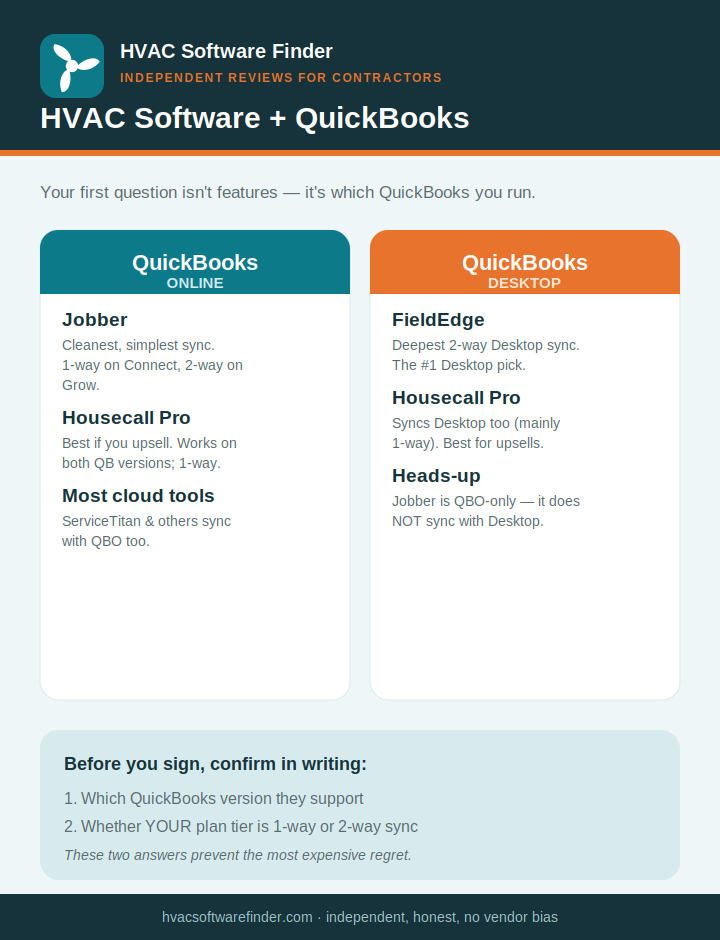
Quick answer: The right QuickBooks-compatible HVAC software depends almost entirely on one thing — which version of QuickBooks you run. If you’re on QuickBooks Online, Jobber has the cleanest, simplest sync for small shops, and Housecall Pro is the better pick if you upsell equipment. If you’re still on QuickBooks Desktop (Pro, Premier, or Enterprise) and don’t want to migrate, your shortlist narrows fast — and FieldEdge leads it, with the deepest live two-way Desktop sync in the category. The breakdown below shows exactly which tool fits your setup, and where each one’s sync falls short.
The question nobody answers honestly: Online or Desktop?
Search “HVAC software compatible with QuickBooks” and almost every result is a software vendor’s own page telling you their product integrates with QuickBooks — full stop. What they conveniently skip is the single most important detail for an HVAC contractor: QuickBooks Online and QuickBooks Desktop are completely different integration problems, and most field service tools only handle one of them.
We’re independent. We don’t sell field service software and have nothing to push, so we can tell you the part the vendor pages leave out — including which “QuickBooks integrations” are smooth two-way syncs and which are one-way exports that’ll still leave your bookkeeper doing manual cleanup. We earn affiliate commissions if you sign up for some tools through our links, and that’s what keeps this site free, but it never changes our rankings or the cons we list.
Here’s the rule that matters before you look at a single feature list:
- On QuickBooks Online? You have good options — Jobber and Housecall Pro both sync with QBO, and so do ServiceTitan and most modern cloud tools. Your decision comes down to features and price, not compatibility.
- On QuickBooks Desktop (Pro / Premier / Enterprise)? Your options shrink — but you’re not stuck. FieldEdge has the deepest, true two-way Desktop sync and is the natural first pick. Housecall Pro and ServiceTitan also connect to Desktop (Housecall Pro’s is primarily one-way), and Service Fusion supports it too. The one big exception: Jobber does not sync with Desktop at all — it’s QuickBooks Online only. So your version of QuickBooks still shapes your shortlist; it just doesn’t gut it.
What “syncs with QuickBooks” should actually mean
Not all QuickBooks integrations are equal, and the marketing word “integrates” hides a lot. When you evaluate a tool, the things that genuinely matter to a small HVAC shop are:
- One-way vs. two-way sync. One-way means invoices and payments flow from your field software into QuickBooks. Two-way means changes your bookkeeper makes in QuickBooks flow back the other way too. One-way is fine for many small shops; two-way matters if your office regularly edits records in QuickBooks.
- What actually syncs. Invoices and payments are the baseline. The better integrations also sync customers, line items, and — for HVAC specifically — your flat-rate pricebook.
- Sync error handling. Duplicate customers, missing payments, and category-mapping mistakes are the real-world headaches. When they happen, you want a human support team, not an AI chatbot.
- Which plan tier unlocks it. On several platforms the QuickBooks sync is gated behind a mid- or upper-tier plan, so the integration you’re counting on may cost more than the entry price suggests.
How we evaluate
For this guide we weighted QuickBooks fit above everything else: which QuickBooks versions each tool supports (Online, Desktop, or both), whether the sync is one-way or two-way, what data actually transfers, which plan tier unlocks it, the real cost including implementation fees, and what verified contractors report on G2, Capterra, and trade forums about sync reliability. Everything is weighted toward shops under 15 techs, because that’s who this site serves.
The best HVAC software for QuickBooks, by your setup
1. Jobber — best for QuickBooks Online shops that want simple
For a small HVAC shop already on QuickBooks Online, Jobber offers the cleanest, most forgiving sync in the category. It’s built for service businesses running 1 to 15 trucks, you can be live in under a day with no implementation fee, and the QBO connection syncs invoices, payments, and customers without the manual workarounds that plague some competitors. It’s the tool we’d point most small QBO shops to first.
The honest catch is on the sync direction and pricing tier. Jobber’s QuickBooks sync is QuickBooks Online only — it does not work with QuickBooks Desktop. And the sync is one-way on the lower-cost Connect plan (roughly $119/month), meaning invoices and payments flow into QuickBooks but your bookkeeper’s edits in QuickBooks don’t flow back. Genuine two-way sync requires the Grow plan (around $239/month). For a lot of small shops one-way is perfectly adequate, but know which one you’re buying.
Where it falls short: QBO only (no Desktop), two-way sync is gated to the higher tier, and Jobber has less HVAC-specific depth than the specialists — no native flat-rate pricebook or good/better/best proposal flow.
Best for: Small HVAC shops on QuickBooks Online that want the simplest possible setup. Read our full Jobber review.
2. Housecall Pro — best for equipment-upsell shops on either QuickBooks
If your money is in equipment replacement, Housecall Pro is the stronger pick — and unlike Jobber, it isn’t limited to QuickBooks Online. Housecall Pro connects to both QuickBooks Online and QuickBooks Desktop, syncing invoices, customers, services, and payments to avoid double entry. Its standout feature is on-site good/better/best proposals with photos and financing, which published case studies link to a 15–25% lift in average ticket, and it pairs that with the best mobile app in the category and solid maintenance-agreement and recurring-billing tools.
Two honest cautions. First, Housecall Pro’s sync is primarily one-way — designed to push invoices and payments into QuickBooks rather than pull bookkeeper edits back out — so if you need deep two-way Desktop sync, FieldEdge still does that better. Second, and more important for accounting: Housecall Pro’s support is chat- and AI-first, which is a real pain point precisely when you hit a sync error and need a human to untangle a duplicated customer or a mismatched payment.
Where it falls short: one-way QBO sync, AI-first support that struggles with integration troubleshooting, and weaker reporting than the big specialists.
Best for: Residential HVAC shops that sell equipment with tiered proposals, on either QuickBooks Online or Desktop. Read our full Housecall Pro review.
3. FieldEdge — best for QuickBooks Desktop two-way sync
If your shop still runs QuickBooks Desktop — Pro, Premier, or Enterprise — and you have no intention of migrating to the cloud, FieldEdge is the tool built for exactly that. Formerly known as dESCO, it has the tightest live, two-way QuickBooks Desktop integration on the market: invoices, payments, customers, and pricebook data sync bi-directionally without the manual cleanup other tools require. While Housecall Pro and ServiceTitan also connect to Desktop, FieldEdge’s sync is deeper and genuinely two-way — that’s its real edge. It also handles the awkward “create the employee in QuickBooks first” requirement that competitors fumble. Its Coolfront flat-rate pricebook is HVAC-native, and its service-agreement automation is class-leading for membership billing and maintenance renewals.
This depth comes at a cost. FieldEdge is roughly $100–125 per user per month plus an implementation fee (commonly $500–$2,000), with a typical 12-month contract and no self-serve trial. And there’s a reputation caveat worth knowing: since FieldEdge was acquired by Xplor Technologies, contractors have reported a decline in support quality, a dated interface, and a mobile app that lags the polish of Housecall Pro or ServiceTitan.
Where it falls short: dated interface and a less-polished mobile app, post-acquisition support complaints, a strict annual contract, and no free trial. If you’re on QuickBooks Online, FieldEdge is usually the wrong choice — Jobber or Housecall Pro will be cheaper and smoother.
Best for: Established HVAC and plumbing shops on QuickBooks Desktop that want the deepest true two-way sync and HVAC-native flat-rate pricing. Read our full FieldEdge review.
4. ServiceTitan — deepest QuickBooks support, but enterprise-priced
ServiceTitan syncs with both QuickBooks Online and QuickBooks Desktop and has the operational depth to back it up — but it’s an enterprise platform priced for large operations. At roughly $245–400+ per tech per month plus a substantial implementation fee and a multi-year contract, it only makes financial sense once you’re past about 10 techs and $2M in revenue. For a small shop, you’d be paying enterprise money for a QuickBooks sync that Jobber or FieldEdge delivers at a fraction of the cost.
Where it falls short: dramatically overpriced for shops under 10 techs, long onboarding, and a steep learning curve. The QuickBooks support is excellent — it’s everything around it that small shops can’t justify.
Best for: Larger HVAC operations (20+ techs, $2M+ revenue) that happen to need QuickBooks sync as part of a much bigger platform. Read our full ServiceTitan review.
A note on Service Fusion and others
A few other tools support QuickBooks Desktop — Service Fusion is the most commonly cited mid-market option, and it’s cheaper than ServiceTitan. We’re researching it for a future review; if you’re on Desktop and FieldEdge feels like overkill, it’s worth a look. Just confirm the current sync details directly with the vendor, because Desktop support is exactly the kind of feature that quietly changes.
How to choose in 60 seconds
- QuickBooks Online + want simple and cheap → Jobber.
- You upsell equipment (either QuickBooks version) → Housecall Pro.
- QuickBooks Desktop + want the deepest two-way sync → FieldEdge.
- Large operation that needs everything → ServiceTitan.
One last piece of advice: before you commit, confirm two things with the vendor in writing — which QuickBooks version they support, and whether the sync on your plan tier is one-way or two-way. Those two answers prevent the most common (and most expensive) HVAC software regret.
Frequently asked questions
What’s the best HVAC software that works with QuickBooks?
It depends on your QuickBooks version and how you sell. On QuickBooks Online, Jobber has the cleanest sync for small shops. If you upsell equipment, Housecall Pro is the best fit and works with both QuickBooks Online and Desktop. For the deepest two-way QuickBooks Desktop sync, FieldEdge leads.
Does Jobber work with QuickBooks Desktop?
No. Jobber integrates with QuickBooks Online only. If you’re committed to QuickBooks Desktop, look at FieldEdge, ServiceTitan, or Service Fusion instead.
What’s the difference between one-way and two-way QuickBooks sync?
One-way sync sends invoices and payments from your field software into QuickBooks. Two-way sync also pulls changes made in QuickBooks back into your field software. Housecall Pro’s sync is primarily one-way (on both QuickBooks versions); FieldEdge and ServiceTitan offer true two-way sync.
Which HVAC software has the best QuickBooks integration overall?
For depth and reliability, FieldEdge (Desktop) and ServiceTitan (both versions) lead. For simplicity on QuickBooks Online at a small-shop price, Jobber is hard to beat.
Will QuickBooks integration cost extra?
Often, yes. On several platforms the QuickBooks sync — especially two-way sync — is unlocked only on a mid- or upper-tier plan. Always confirm which tier includes the sync you need before signing up.
This guide is independent and reader-supported. Some links to software are affiliate links, meaning we may earn a commission at no extra cost to you if you sign up — this never affects our recommendations or the cons we list. Pricing, plan tiers, and QuickBooks compatibility change often; verify current details on each provider’s website before purchasing. Last reviewed: 2026.